Step 3: Compose a Site
One site can combine publications that build on their own cadence: the shell brings the chrome, and the parcels bring content.
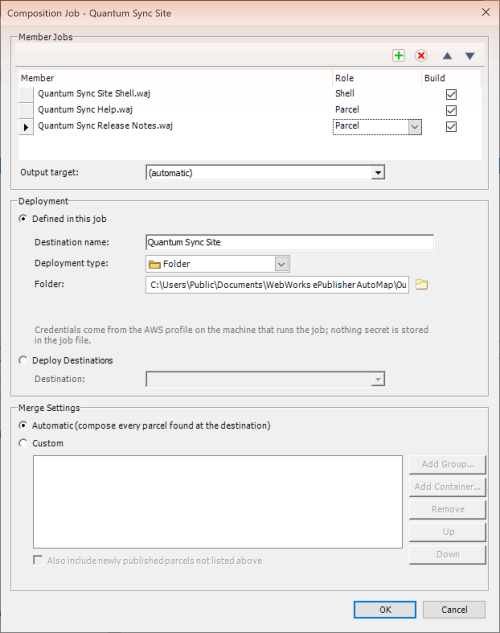
Choose File > New Job, choose Compose published parcels into a website (Composition Job), and click OK. A small prompt asks for a name: enter Quantum Sync Site and click OK. The Composition Job - Quantum Sync Site editor opens.
Under Member Jobs, click the Add button (the green plus) and pick Quantum Sync Site Shell, then Quantum Sync Help, then Quantum Sync Release Notes; the members appear by file name.
Click each member's Role cell and set it: Shell for Quantum Sync Site Shell, Parcel for the other two (not Infer). Leave Build checked and Output target on (automatic).
Set Merge Settings to Automatic (compose every parcel found at the destination).
Set Deployment to Defined in this job, Destination name: Quantum Sync Site, Deployment type: Folder, and Folder:
Documents\WebWorks ePublisher AutoMap\Output\Quantum Sync Site. Click OK.Select Quantum Sync Site and choose Job > Run. Accept the scheduled-task properties with OK the first time. The three members build in turn, in about four minutes.
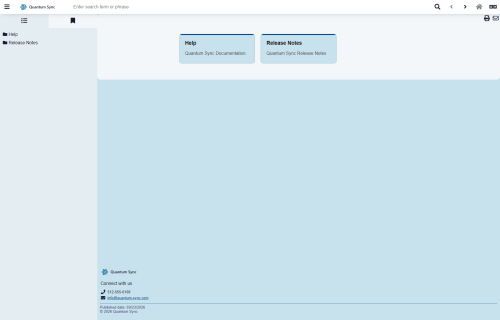
Choose Job > Preview Output in Browser > Quantum Sync Site. One site shows Help and Release Notes side by side in the contents (the parcels can take a moment to appear after the chrome loads).