Running Transit Menu in Secure Environments
The WebWorks Transit menu is a Microsoft Word template with macros, transit.dotm, which Word loads as an add-in when it starts. The template is digitally signed by Quadralay Corporation.
If Microsoft Word is set to Disable all macros except digitally signed macros (File > Options > Trust Center > Trust Center Settings > Macro Settings), Word does not run the WebWorks Transit macros until you trust Quadralay Corporation as a publisher by choosing Trust all documents from this publisher. You make this choice once. Word asks again only when the template is signed with a renewed Quadralay Corporation certificate.
Administrators who want to deploy the Quadralay Corporation certificate to the Trusted Publishers store instead, and test whether users then still need to make this choice, can see Trusting the publisher centrally in the ePublisher Silent Installation Guide.
Open a Microsoft Word document, or a blank document.
On the File menu, click Info.
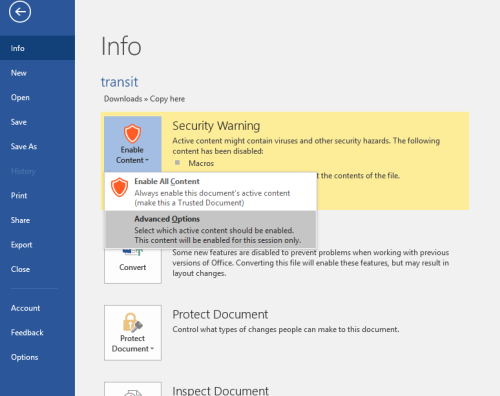
If Microsoft Word displays a security warning that macros have been disabled, click Enable Content, and then click Advanced Options. Microsoft Word displays a window similar to the following figure before you click Advanced Options.
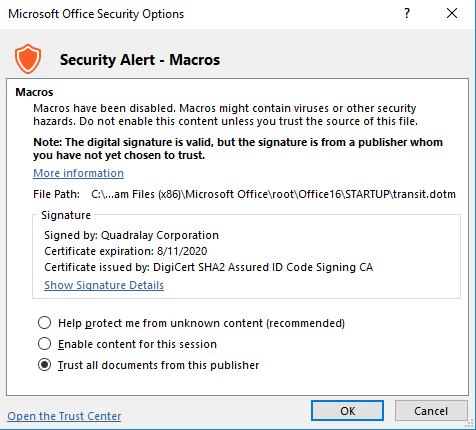
In the Microsoft Office Security Options window, verify that it names Quadralay Corporation as the signer and states: The digital signature is valid, but the signature is from a publisher whom you have not yet chosen to trust. Select Trust all documents from this publisher, and then click OK.
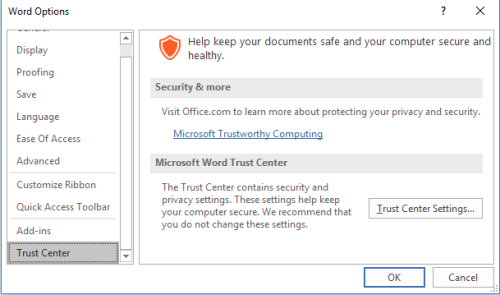
To confirm that Quadralay Corporation is trusted, on the File menu, click Options, click Trust Center, and then click Trust Center Settings. Microsoft Word displays a window similar to the following figure.
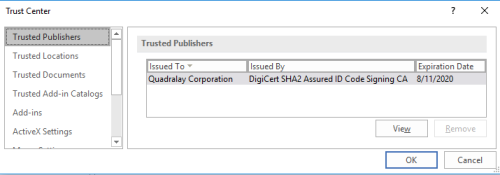
Click Trusted Publishers. Quadralay Corporation appears in the list, as the following figure shows.