Deploy Scope
Every target declares which slice of its generated output a deployment publishes. The Deploy field in Target Settings offers three options:
Everything (complete site)
The default, and the behavior of all releases before this feature: the deployment copies the complete generated output. Use this for a standalone (non-federated) site.
Groups (content only)
The deployment publishes only the target's content groups and their deployed records — no site files. Use this for every parcel project in a federation.
Shell (site files only)
The deployment publishes only the site files (entry page, styles, scripts, search page, root sitemap) and the shell's deployed record — no content groups. Use this for the shell project in a federation.
For targets whose format does not support federation, the field is disabled and always deploys everything.
Deployments are additive within their slice: a scoped deployment (and a scoped AutoMap Clean) affects only its own slice of the deployed output and never deletes another project's files.
The same fields appear in the AutoMap Administrator job wizard's target configuration page, so a job can declare its scope without opening the project:
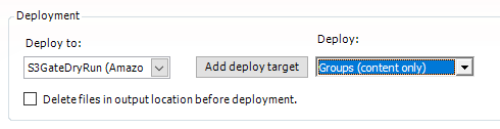
In an AutoMap job file, the optional deployScope attribute on a <Target> element (everything, groups, or shell) overrides the scope declared in the project, and the --deployscope command-line option overrides both. When a composition job builds its members, it sets the scope automatically from each member's declared role, so a composition-driven federation cannot be mis-scoped.