Modifying Help System Title Bars
The title bar in your generated help system displays the title you assigned to your project. If you want to specify a different title in the title bar for your generated help system, you can do this in the Merge Settings window if you are generating output for the following help systems:
Dynamic HTML
Eclipse Help
Microsoft HTML Help
WebWorks Help
WebWorks Reverb
You cannot use merge settings to modify help system title bars for other output formats.
To modify the title bar of a help system
On the Project menu, select the target next to Active Target for which you want to modify the title bar of a help system.
On the Target menu, click Merge Settings.
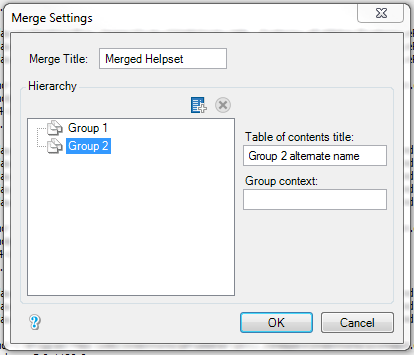
In the Merge Title field, type the title you want to display in the title bar for your generated help system, and then click OK.
On the File menu, click Save.
Regenerate your output. For more information, see Regenerating Output