Viewing Output by Automatically Opening Generated Output
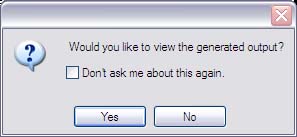
When you generate or regenerate output for a target, after ePublisher generates output, ePublisher prompts you to view the generated output by displaying the following window:
To view output by automatically opening the output
Generate or regenerate output. For more information, see Generating Output or Regenerating Output.
When ePublisher displays a window asking if you would like to view the generated output, perform one of the following actions:
If you want to view the generated output, click Yes.
If you do not want to view the generated output, click No.
If you want ePublisher to automatically open the output each time you generate output and you do not want ePublisher to ask you each time if you want to view the generated output, select the Don't ask me about this again check box, and then click Yes.
If you do not want ePublisher to automatically open the output each time you generate output and you do not want ePublisher to ask you each time if you want to view the generated output, select the Don't ask me about this again check box, and then click No.
If you select the Don't ask me about this again check box and specify that you always want ePublisher to display the generate