How to add an image icon and stylize your DITA Hazard statement elements?
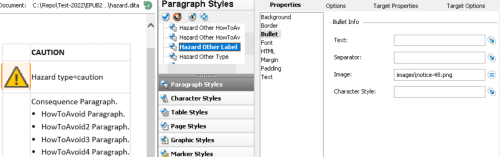
Specify an image file to use for your Hazard Caution Label paragraph style in the Style Designer.
It will show up to the left of your content's Hazard statement.
For example:
ePublisher Designer Display Preview
For each type of Hazard statement, there are a set of Designer styles as follows:
Paragraph
Hazard
<Type>Hazard
<Type>ConsequenceHazard
<Type>HowToAvoidHazard
<Type>HowToAvoid EndHazard
<Type>LabelHazard
<Type>Type
Table
Hazard
<Type>
Note:
There is a placeholder style used that is shared by all Hazard statements for the empty regions of the table. It does not need to be styled.
Paragraph
Hazard Empty
Last modified date: 2026-01-29